> ## Documentation Index
> Fetch the complete documentation index at: https://veekthoven-laravel-inertia-toast-24-61.mintlify.site/llms.txt
> Use this file to discover all available pages before exploring further.
# Introduction
> Beautiful toast notifications for Laravel + Inertia.js applications with Vue 3 and React support.
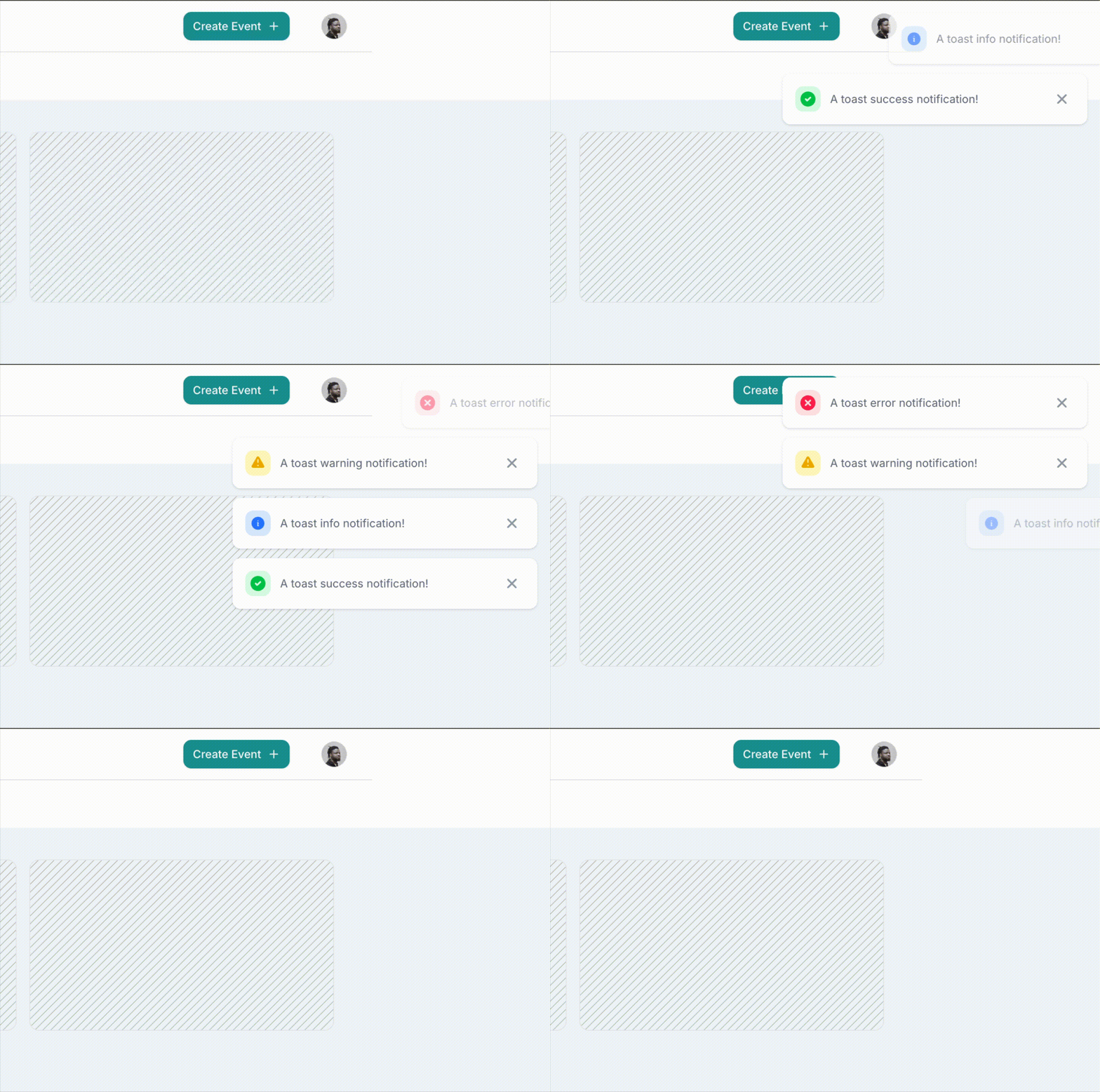
Laravel Inertia Toast is an opinionated package that provides beautiful toast notifications for Laravel + Inertia.js applications. It offers a fluent PHP API, multi-toast support, redirect-safe notifications, with dedicated Vue 3 and React adapters.
 ## Trigger toasts from anywhere
Toast notifications can be triggered from both your backend (PHP) and frontend (JavaScript). Use `Toast::success('Saved!')` in your controllers or `useToast().success('Copied!')` in your components — same beautiful toasts either way.
```php theme={null}
// In your Laravel controller
use InertiaToast\Facades\Toast;
Toast::success('Profile updated!');
return redirect()->route('dashboard');
```
```javascript theme={null}
// In your Vue or React component
const { success } = useToast()
success('Copied to clipboard!')
```
## Key features
Use `toast('Saved!')->success()` or `Toast::success('Saved!')` for intuitive toast creation
Dedicated Vue 3 and React adapters with full TypeScript support
6 position options: top-right, top-left, top-center, bottom-right, bottom-left, bottom-center
Beautiful designs using Tailwind CSS (v3 & v4 compatible)
Add context with optional toast titles for important notifications
Smooth in/out animations for a polished user experience
## What makes it special
### Redirect-safe
Toasts persist across redirects, making them perfect for form submissions and controller actions that redirect users to different pages.
### Multi-toast support
Display multiple toasts simultaneously with configurable maximum visible limit. Oldest toasts are automatically removed when the limit is exceeded.
### Client-side API
Both Vue and React adapters expose a `useToast()` composable/hook for triggering toasts from the frontend, giving you complete flexibility in how you notify users.
### Type-safe
Full TypeScript support in both Vue and React adapters ensures you catch errors at compile time.
## Quick links
Install and set up Laravel Inertia Toast in your project
Get your first toast working in minutes
Learn how to use the PHP API
Use the Vue and React APIs
## Requirements
* PHP 8.1+
* Laravel 10, 11, or 12
* Inertia.js v2.3.3+
* Vue 3.3+ or React 18+
* Tailwind CSS v3 or v4
## Packages
Laravel Inertia Toast consists of three packages:
| Package | Description |
| ---------------------------------- | ------------------------------------------------------- |
| `veekthoven/laravel-inertia-toast` | PHP package — Facade, helper, Inertia flash integration |
| `@laravel-inertia-toast/vue` | Vue 3 adapter — Plugin, composable, components |
| `@laravel-inertia-toast/react` | React adapter — Provider, hook, components |
You can install and use the frontend adapters without the backend package. But to use the backend package, you need to install and set up the adapter for your frontend framework. For the full experience, use both backend and frontend packages in a Laravel + Inertia.js app.
## Trigger toasts from anywhere
Toast notifications can be triggered from both your backend (PHP) and frontend (JavaScript). Use `Toast::success('Saved!')` in your controllers or `useToast().success('Copied!')` in your components — same beautiful toasts either way.
```php theme={null}
// In your Laravel controller
use InertiaToast\Facades\Toast;
Toast::success('Profile updated!');
return redirect()->route('dashboard');
```
```javascript theme={null}
// In your Vue or React component
const { success } = useToast()
success('Copied to clipboard!')
```
## Key features
Use `toast('Saved!')->success()` or `Toast::success('Saved!')` for intuitive toast creation
Dedicated Vue 3 and React adapters with full TypeScript support
6 position options: top-right, top-left, top-center, bottom-right, bottom-left, bottom-center
Beautiful designs using Tailwind CSS (v3 & v4 compatible)
Add context with optional toast titles for important notifications
Smooth in/out animations for a polished user experience
## What makes it special
### Redirect-safe
Toasts persist across redirects, making them perfect for form submissions and controller actions that redirect users to different pages.
### Multi-toast support
Display multiple toasts simultaneously with configurable maximum visible limit. Oldest toasts are automatically removed when the limit is exceeded.
### Client-side API
Both Vue and React adapters expose a `useToast()` composable/hook for triggering toasts from the frontend, giving you complete flexibility in how you notify users.
### Type-safe
Full TypeScript support in both Vue and React adapters ensures you catch errors at compile time.
## Quick links
Install and set up Laravel Inertia Toast in your project
Get your first toast working in minutes
Learn how to use the PHP API
Use the Vue and React APIs
## Requirements
* PHP 8.1+
* Laravel 10, 11, or 12
* Inertia.js v2.3.3+
* Vue 3.3+ or React 18+
* Tailwind CSS v3 or v4
## Packages
Laravel Inertia Toast consists of three packages:
| Package | Description |
| ---------------------------------- | ------------------------------------------------------- |
| `veekthoven/laravel-inertia-toast` | PHP package — Facade, helper, Inertia flash integration |
| `@laravel-inertia-toast/vue` | Vue 3 adapter — Plugin, composable, components |
| `@laravel-inertia-toast/react` | React adapter — Provider, hook, components |
You can install and use the frontend adapters without the backend package. But to use the backend package, you need to install and set up the adapter for your frontend framework. For the full experience, use both backend and frontend packages in a Laravel + Inertia.js app.